
Airtable Integration: Build a Custom Project Management App in Minutes
Airtable Integration: Build a Custom Project Management App in Minutes
Airtable has revolutionized how teams organize data, but its interface has limitations when you need a truly custom application. What if you could use Airtable as your database backend while building exactly the UI your team needs? With Cocoding AI's Airtable integration, you can create powerful project management applications in minutes.
Why Airtable as a Backend?
Airtable combines the simplicity of spreadsheets with the power of databases, making it perfect for:
- Rapid prototyping - Set up data structures in minutes
- Non-technical collaboration - Anyone can manage the data
- Flexible schemas - Easily add fields as needs evolve
- Built-in features - Attachments, linked records, formulas
But Airtable's interface isn't always ideal for daily workflows. That's where Cocoding AI comes in.
What You Can Build
Complete Assignment Management System
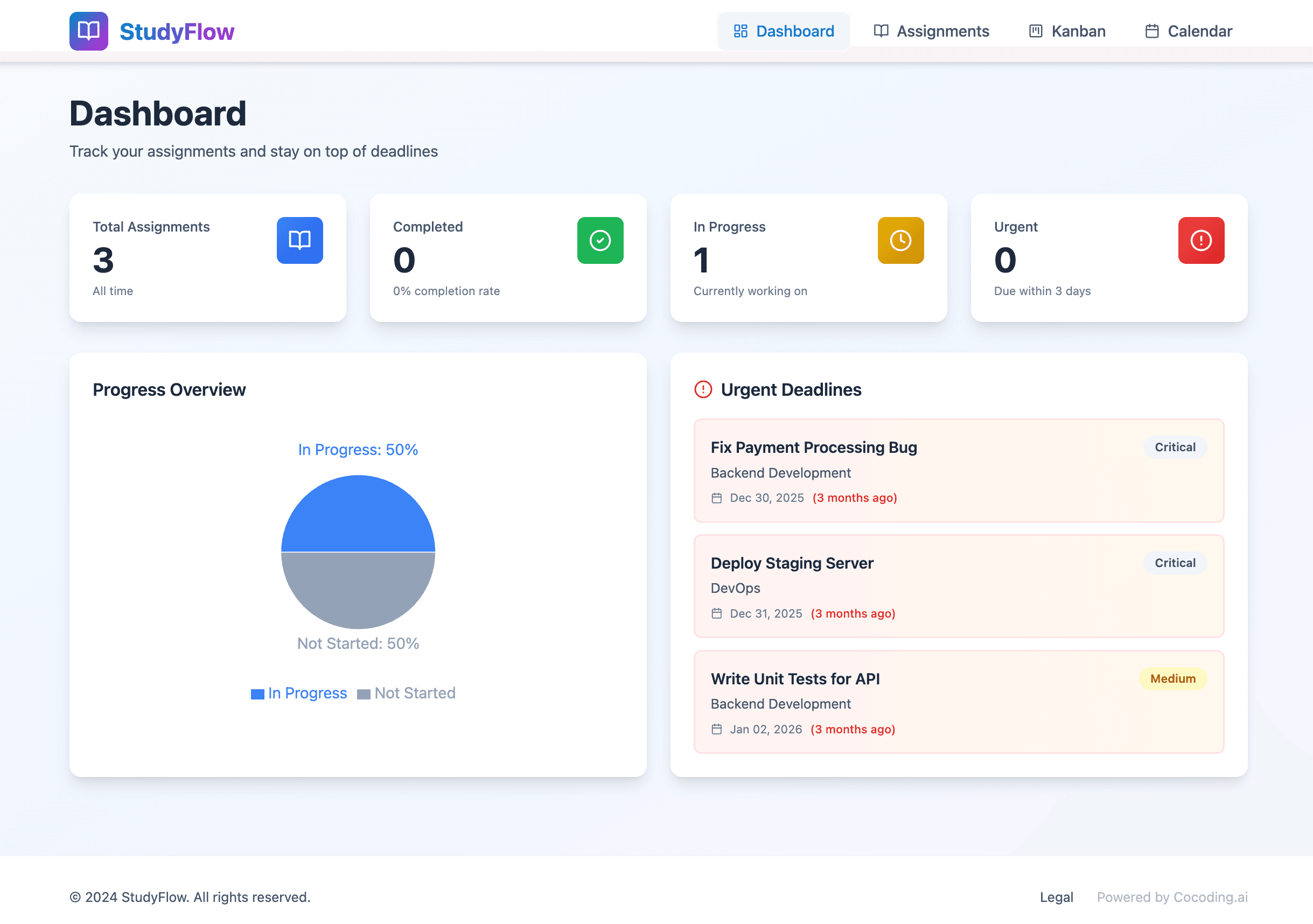
Cocoding AI generates a fullstack application with:
Application Features:
├── Dashboard with Statistics
│   ├── Total assignments
│   ├── Completed count
│   ├── Pending count
│   └── Completion rate
├── Kanban Board
│   ├── Drag-and-drop functionality
│   ├── Status columns
│   └── Quick status updates
├── Calendar View
│   ├── Deadline visualization
│   ├── Due date filtering
│   └── Timeline overview
└── CRUD Operations
    ├── Create assignments
    ├── Edit details
    ├── Delete records
    └── Bulk actions
Key Capabilities
| Feature | Description |
|---|---|
| Real-time sync | Changes reflect in Airtable instantly |
| Search & filter | Find assignments quickly |
| Drag-and-drop | Intuitive Kanban management |
| Responsive design | Works on desktop and mobile |
| Multi-view | Switch between board, calendar, table |
Technical Architecture
Tech Stack:
├── Frontend
│   ├── React - UI components
│   └── Tailwind CSS - Styling
├── Backend
│   ├── NestJS - API framework
│   └── Airtable REST API - Data layer
└── Features
    ├── CRUD operations
    ├── Search functionality
    └── View management
Step-by-Step Setup Guide
Step 1: Set Up Your Airtable Base
Create a new Airtable base with an "Assignments" table:

| Field Name | Field Type | Options/Details |
|---|---|---|
| Name | Single line text | Assignment title |
| Status | Single select | To Do, In Progress, Done |
| Priority | Single select | High, Medium, Low |
| Due Date | Date | Deadline |
| Description | Long text | Details |
| Assignee | Single line text | Team member |


Step 2: Get Your API Credentials
- Visit airtable.com/create/tokens
- Click "Create new token"
- Name it (e.g., "Project App")
- Add scopes:
data.records:readdata.records:write
- Add your base to the access list
- Create and copy the token (starts with
pat)

Step 3: Find Your Base ID
- Open your base in Airtable
- Click "Help" > "API documentation"
- Your Base ID appears in the URL (starts with
app)
Step 4: Generate Your Application
Describe your needs to Cocoding AI:
Build a project management app with Airtable backend:
- React frontend with Tailwind CSS
- NestJS backend
- Dashboard showing assignment statistics
- Kanban board with drag-and-drop
- Calendar view for deadlines
- Full CRUD for assignments
- Search and filter functionality
- Connect to my Airtable "Assignments" table
Step 5: Configure Environment
Add credentials to your backend:
# backend/.env
AIRTABLE_API_KEY=patXXXXXXXXXXXXXX
AIRTABLE_BASE_ID=appXXXXXXXXXXXXXX
AIRTABLE_TABLE_NAME=Assignments

Step 6: Launch and Verify
- Start your servers
- Check the dashboard statistics
- Test CRUD operations
- Verify Kanban drag-and-drop
- Confirm calendar view displays correctly

Building the Perfect Dashboard
Statistics Panel
Your dashboard displays real-time metrics:
┌──────────────────────────────────────────────────────┐
│              Assignment Dashboard                    │
├──────────────────────────────────────────────────────┤
│                                                      │
│   📊 Total        ✅ Completed    ⏳ Pending        │
│      47              28              19              │
│                                                      │
│   Completion Rate: 59.6%                             │
│   Due This Week: 8                                   │
│                                                      │
└──────────────────────────────────────────────────────┘
Kanban Board
Visual workflow management:
┌─────────────┬─────────────┬─────────────┐
│   To Do     │ In Progress │    Done     │
├─────────────┼─────────────┼─────────────┤
│ ┌─────────┐ │ ┌─────────┐ │ ┌─────────┐ │
│ │ Task A  │ │ │ Task C  │ │ │ Task E  │ │
│ │ High 🔴 │ │ │ Med 🟡  │ │ │ Low 🟢  │ │
│ │ Due: 5/1│ │ │ Due: 5/3│ │ │ Done ✓  │ │
│ └─────────┘ │ └─────────┘ │ └─────────┘ │
│ ┌─────────┐ │ ┌─────────┐ │ ┌─────────┐ │
│ │ Task B  │ │ │ Task D  │ │ │ Task F  │ │
│ │ Med 🟡  │ │ │ High 🔴 │ │ │ Med 🟡  │ │
│ │ Due: 5/2│ │ │ Due: 5/4│ │ │ Done ✓  │ │
│ └─────────┘ │ └─────────┘ │ └─────────┘ │
└─────────────┴─────────────┴─────────────┘
Calendar View
Deadline-focused planning:
         May 2025
┌────┬────┬────┬────┬────┬────┬────┐
│Sun │Mon │Tue │Wed │Thu │Fri │Sat │
├────┼────┼────┼────┼────┼────┼────┤
│    │    │    │  1 │  2 │  3 │  4 │
│    │    │    │ 🔴 │ 🟡 │ 🟡 │    │
├────┼────┼────┼────┼────┼────┼────┤
│  5 │  6 │  7 │  8 │  9 │ 10 │ 11 │
│    │ 🔴 │    │ 🟢 │    │ 🟡 │    │
├────┼────┼────┼────┼────┼────┼────┤
│ 12 │ 13 │ 14 │ 15 │ 16 │ 17 │ 18 │
│    │    │ 🔴 │    │ 🟡 │    │    │
└────┴────┴────┴────┴────┴────┴────┘

🔴 High Priority  🟡 Medium  🟢 Low
Advanced Use Cases
Use Case 1: Marketing Campaign Tracker
Airtable Structure:
- Campaigns table (name, status, budget, channel)
- Tasks table (linked to campaigns)
- Assets table (with attachments)
Custom App Features:
- Campaign dashboard with budget tracking
- Task Kanban per campaign
- Asset gallery with previews
Use Case 2: Content Calendar
Airtable Structure:
- Content items (title, status, publish date, author)
- Categories (linked records)
- Platforms (multi-select)
Custom App Features:
- Calendar view of publish dates
- Status workflow board
- Bulk scheduling interface
Use Case 3: Inventory Management
Airtable Structure:
- Products (name, SKU, quantity, reorder level)
- Suppliers (linked records)
- Orders (with quantities)
Custom App Features:
- Low stock alerts dashboard
- Quick reorder interface
- Supplier management
Use Case 4: Client Project Tracker
Airtable Structure:
- Clients (name, contact, status)
- Projects (linked to clients)
- Milestones (linked to projects)
Custom App Features:
- Client portal with project visibility
- Milestone timeline view
- Progress reporting
Extending Your Application
Ask Cocoding AI to add features:
User Authentication
Add JWT-based authentication with login/register pages
so team members can have individual accounts.
Role-Based Access
Implement role-based access control where admins can
manage all assignments but users only see their own.
Notifications
Add email notifications when assignments are due within
24 hours or when status changes.
File Attachments
Enable file uploads that sync to Airtable's attachment
field for each assignment.
Export Functionality
Add CSV and PDF export for assignment lists and
project reports.
Performance Optimization
Caching Strategy
Reduce API calls with intelligent caching:
- Cache read operations for 5 minutes
- Invalidate on write operations
- Use background sync for updates
Pagination
Handle large datasets efficiently:
- Load 50 records per page
- Infinite scroll support
- Server-side filtering
Real-Time Updates
Keep data fresh:
- Polling every 30 seconds
- Webhook support (Airtable Enterprise)
- Optimistic UI updates
Comparing Solutions
| Feature | Cocoding + Airtable | Native Airtable | Other No-Code |
|---|---|---|---|
| Custom UI | Full control | Limited views | Template-based |
| Kanban | Custom styling | Basic | Varies |
| Performance | Optimized | Standard | Varies |
| Mobile experience | PWA-ready | App-based | Limited |
| Branding | Complete | Airtable branding | Limited |
| Cost | Included | Airtable plan | Additional fees |
Best Practices
Data Structure
- Keep tables focused - One purpose per table
- Use linked records - Establish relationships
- Consistent naming - Clear field names
- Appropriate field types - Match data to type
API Usage
- Respect rate limits - 5 requests/second
- Batch operations - Combine when possible
- Handle errors gracefully - Retry logic
- Cache appropriately - Reduce redundant calls
User Experience
- Loading states - Show progress indicators
- Error messages - Clear, actionable feedback
- Confirmation dialogs - Prevent accidents
- Keyboard shortcuts - Power user support
Getting Started Today
Ready to supercharge your Airtable experience?
- Sign up at cocoding.ai
- Set up your Airtable base
- Get your API credentials
- Describe your ideal application
- Build and deploy in minutes
Conclusion
Airtable is an incredible tool for data organization, but its interface doesn't always match your workflow needs. With Cocoding AI's Airtable integration, you get the best of both worlds: Airtable's flexible data layer with a completely custom user interface.
Whether you're managing projects, tracking content, organizing inventory, or handling any other data-driven workflow, you can build the exact application your team needs—all without writing code.
Stop adapting to your tools. Make your tools adapt to you.
Have questions about building with Airtable? Our team is ready to help you create the perfect application for your workflow.