
OpenAI Integration: Build a RAG Chatbot That Answers Questions From Your PDFs
OpenAI Integration: Build a RAG Chatbot That Answers Questions From Your PDFs
Large Language Models are powerful, but they have a critical flaw: hallucinations. They confidently make up information that sounds plausible but is completely wrong. What if you could build an AI chatbot that ONLY answers from your documents, with zero made-up facts? With Cocoding AI's OpenAI integration, you can build a Retrieval-Augmented Generation (RAG) system that's grounded in truth.
The sections below walk through the build prompt, OpenAI (embeddings) and Groq (chat) API keys, wiring backend/.env, and testing your PDF chatbot—end to end.
The Hallucination Problem
Standard chatbots have serious limitations:
- Invented facts - LLMs confidently state false information
- Outdated knowledge - Training data has cutoff dates
- No source citations - Can't verify where answers come from
- Generic responses - No access to your specific documents
- Compliance risks - Wrong information can have legal consequences
RAG solves these problems by grounding AI responses in your actual documents.
What is RAG (Retrieval-Augmented Generation)?
RAG is a technique that combines:
- Retrieval: Find relevant information from your documents
- Augmentation: Add that information to the AI's context
- Generation: AI generates answers using ONLY retrieved content
Traditional Chatbot:
User Question → LLM → Answer (possibly hallucinated)

RAG Chatbot:
User Question → Search Documents → Find Relevant Chunks
    → Send Chunks + Question to LLM → Grounded Answer
Result: Answers that are factual, verifiable, and cite sources.
What You Can Build
Complete RAG Chatbot Application
Cocoding AI generates a full-featured system:
Application Features:
├── Document Management
│   ├── PDF drag-and-drop upload
│   ├── Document library view
│   ├── Delete documents
│   └── Processing status
├── AI Chat Interface
│   ├── Natural language questions
│   ├── Source citations
│   ├── Conversation history
│   └── Follow-up questions
├── Vector Search Engine
│   ├── OpenAI embeddings
│   ├── Semantic similarity search
│   ├── Configurable relevance
│   └── PostgreSQL pgvector
└── User Authentication
    ├── Account creation
    ├── Secure login
    └── Personal document storage
Technical Architecture
Tech Stack:
├── Frontend (React)
│   ├── Document upload UI
│   ├── Chat interface
│   └── Document management
├── Backend (NestJS)
│   ├── PDF text extraction
│   ├── OpenAI embeddings API
│   ├── Groq LLM integration
│   └── Vector similarity search
└── Database (PostgreSQL + pgvector)
    ├── User accounts
    ├── Document metadata
    └── Vector embeddings
How the RAG System Works
The 8-Step Process
Document Ingestion:
┌─────────────────────────────────────────────────────────────────┐
│ 1. Upload PDF                                                   │
│    ↓                                                            │
│ 2. Extract text from PDF                                        │
│    ↓                                                            │
│ 3. Split into ~1000 character chunks                           │
│    ↓                                                            │
│ 4. Generate OpenAI embeddings for each chunk                   │
│    ↓                                                            │
│ 5. Store embeddings in PostgreSQL with pgvector                │
└─────────────────────────────────────────────────────────────────┘

Query Processing:
┌─────────────────────────────────────────────────────────────────┐
│ 6. User asks question → Generate embedding for query           │
│    ↓                                                            │
│ 7. Semantic search → Find top 5 most similar chunks            │
│    ↓                                                            │
│ 8. Send chunks + question to Groq LLM → Return grounded answer │
└─────────────────────────────────────────────────────────────────┘
Vector Embeddings Explained
Embeddings convert text into numerical representations:
Text: "The quarterly revenue increased by 15%"
       ↓ OpenAI Embedding API
Embedding: [0.023, -0.156, 0.892, ..., 0.445] (1536 dimensions)
Similar concepts have similar embeddings, enabling semantic search—finding relevant content even when exact words don't match.
Why Semantic Search Beats Keyword Search
| Query | Keyword Search | Semantic Search |
|---|---|---|
| "How much did we make?" | No results | Finds "revenue", "profit", "earnings" |
| "Team size" | No results | Finds "employees", "headcount", "staff" |
| "Product launch date" | Partial match | Finds "release", "go-live", "deployment" |
Step-by-Step Setup Guide
Follow this sequence: describe the app, add keys, configure .env, then test.
Step 1: Tell Cocoding.ai What to Build
Copy and paste a specification like this into Cocoding.ai (adjust wording if you like—keep the RAG stack explicit):
Build a document-based chatbot application with these features:

Frontend (React):
- User authentication (register/login)
- PDF upload with drag-and-drop
- Document management page
- Chat interface with message history
- Modern UI with Tailwind CSS

Backend (NestJS):
- JWT authentication
- PDF text extraction
- Vector embeddings generation
- Semantic search using embeddings
- Chat API with Groq LLM integration
- PostgreSQL database with pgvector

Technical Requirements:
- Use Groq API for fast LLM responses
- Use OpenAI API for text embeddings
- Store documents and chat history in PostgreSQL
- Implement retrieval-augmented generation (RAG)
- Secure file upload validation
- CORS configuration for API access

RAG Workflow:
1. Extract text from uploaded PDFs
2. Split text into chunks
3. Generate embeddings for each chunk
4. Store embeddings in database
5. On query: find relevant chunks via semantic search
6. Send chunks + question to Groq LLM
7. Return AI-generated answer based only on document content
Cocoding.ai can generate the full stack—frontend, backend, database, and RAG pipeline—automatically.

Step 2: Get API Keys
2.1 OpenAI API Key (embeddings)
- Open platform.openai.com/api-keys
- Sign up or log in
- Click Create new secret key
- Name it (e.g.
RAG Application) and copy it immediately—keys typically start withsk-proj-orsk-
Approximate cost is about $0.02 per 1M tokens for embeddings (e.g. a large PDF is still cents). Add a payment method under Settings → Billing if required and consider a low monthly limit.

2.2 Groq API Key (chat)
- Open console.groq.com/keys
- Sign up or log in
- Create API Key and copy it—keys usually start with
gsk_
Groq offers free chat inference with generous limits for development and many production workloads.
Step 3: Configure Your App with API Keys
In your generated project, edit backend/.env (create it if the template lists placeholders):
GROQ_API_KEY=gsk_YOUR_ACTUAL_GROQ_KEY_HERE
OPENAI_API_KEY=sk-proj-YOUR_ACTUAL_OPENAI_KEY_HERE
Save the file—many setups restart the NestJS backend automatically when env changes.

Also keep database and JWT variables your scaffold expects (for example DATABASE_URL, JWT_SECRET)—see your repo’s .env.example. Your app stores embeddings in PostgreSQL with pgvector and runs similarity search over chunk vectors.
Step 4: Test Your RAG App
Create an account — Open the URL Cocoding.ai provides, sign up with name, email, and password.
Upload a PDF — Use drag-and-drop or file picker, wait for extraction, chunking, embeddings, and storage (often tens of seconds for larger files).
Chat with your document — Open chat on the document and ask grounded questions (for example “What is this document about?” or “Summarize the main points”). Answers should follow your uploaded content, not generic model guesses.
If anything fails, check key prefixes (sk- / sk-proj-, gsk_), stray spaces in .env, billing on OpenAI, and restart the backend.
Reference: pgvector (usually already scaffolded)
Generated apps typically already enable pgvector and similarity search. If you are wiring SQL yourself, store chunk embeddings for cosine search and tune chunk size, embedding model, and “top K” retrieved chunks in your backend services as needed.
Building the User Experience
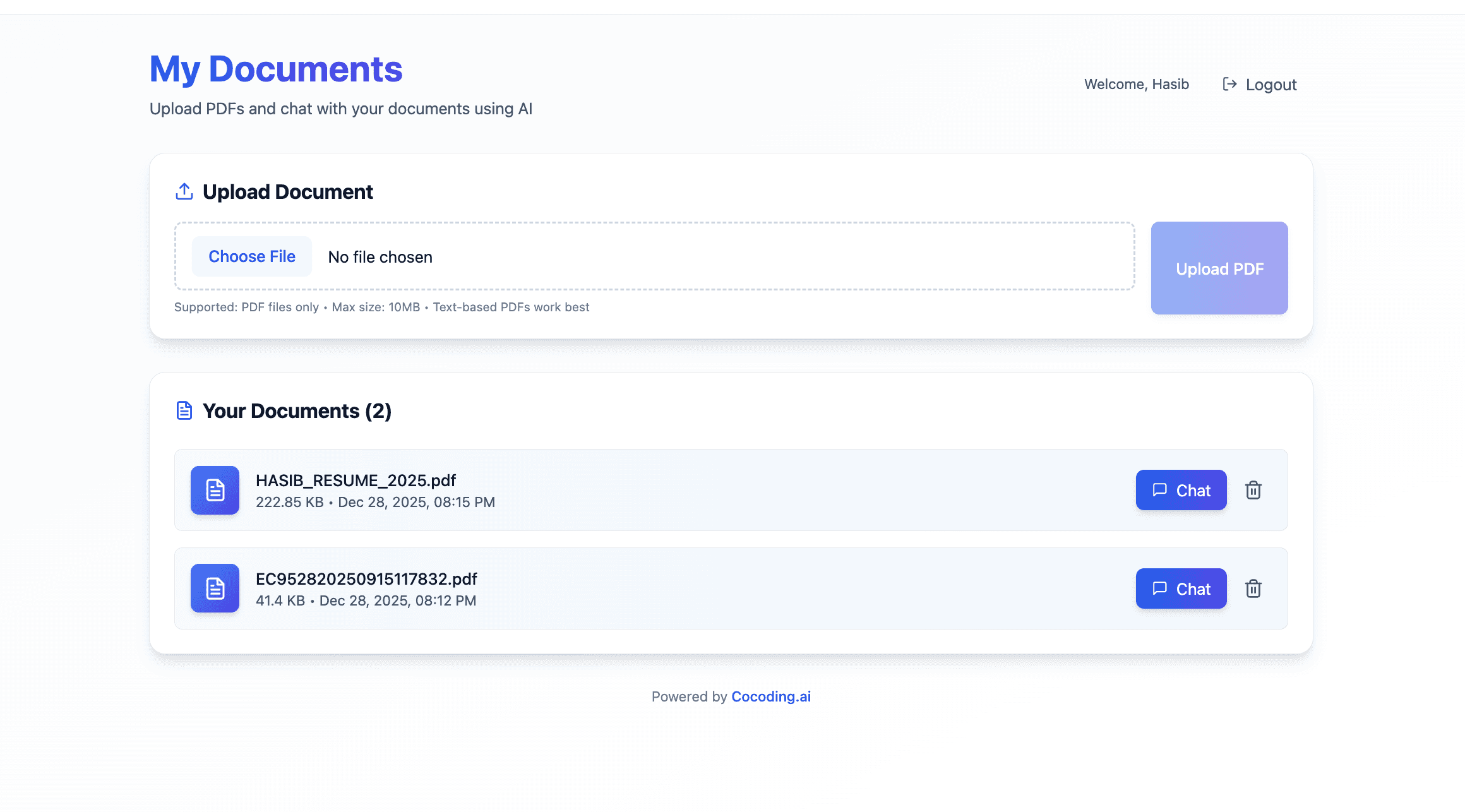
Document Upload Interface
┌──────────────────────────────────────────────────────┐
│              Upload Documents                        │
├──────────────────────────────────────────────────────┤
│                                                      │
│  ┌──────────────────────────────────────────────┐   │
│  │                                              │   │
│  │     📄 Drag and drop PDFs here              │   │
│  │                                              │   │
│  │         or click to browse                   │   │
│  │                                              │   │
│  └──────────────────────────────────────────────┘   │
│                                                      │
│  Uploaded Documents:                                 │
│  ┌──────────────────────────────────────────────┐   │
│  │ 📄 Company_Handbook.pdf     ✅ Ready   [🗑️] │   │
│  │ 📄 Q4_Financial_Report.pdf  ✅ Ready   [🗑️] │   │
│  │ 📄 Product_Manual.pdf       ⏳ Processing   │   │
│  └──────────────────────────────────────────────┘   │
│                                                      │
└──────────────────────────────────────────────────────┘
Chat Interface
┌──────────────────────────────────────────────────────┐
│              Document Q&A                            │
├──────────────────────────────────────────────────────┤
│                                                      │
│  👤 What is our vacation policy?                    │
│                                                      │
│  🤖 According to the Company Handbook, employees    │
│     are entitled to:                                 │
│                                                      │
│     • 15 days of paid vacation per year             │
│     • 5 additional days after 3 years of service    │
│     • Unused days can roll over (max 5 days)        │
│                                                      │
│     📚 Sources:                                      │
│     - Company_Handbook.pdf (page 23)                │
│     - Company_Handbook.pdf (page 24)                │
│                                                      │
│  ─────────────────────────────────────────────────  │
│                                                      │
│  👤 How do I request time off?                      │
│                                                      │
│  🤖 To request time off, follow these steps:        │
│     1. Submit request through HR portal             │
│     2. Request must be submitted 2 weeks in advance │
│     3. Manager approval required for 3+ days        │
│                                                      │
│     📚 Sources:                                      │
│     - Company_Handbook.pdf (page 25)                │
│                                                      │
├──────────────────────────────────────────────────────┤
│ ┌──────────────────────────────────────────────┐    │
│ │ Ask a question about your documents...       │    │
│ └──────────────────────────────────────────────┘    │
│                                      [ Send ]       │
└──────────────────────────────────────────────────────┘
Configuration Options
Embedding Models
| Model | Dimensions | Cost | Best For |
|---|---|---|---|
| text-embedding-3-small | 1536 | $0.02/1M tokens | Cost-effective |
| text-embedding-3-large | 3072 | $0.13/1M tokens | Maximum accuracy |
| text-embedding-ada-002 | 1536 | $0.10/1M tokens | Legacy support |
LLM Options (via Groq)
| Model | Speed | Quality | Best For |
|---|---|---|---|
| llama-3.3-70b | Fast | Excellent | General use |
| llama-3.1-405b | Medium | Best | Complex reasoning |
| mixtral-8x7b | Very fast | Good | Quick responses |
| gemma2-9b | Fastest | Good | High volume |
Chunking Parameters
| Parameter | Default | Range | Impact |
|---|---|---|---|
| Chunk size | 1000 chars | 500-2000 | Larger = more context per chunk |
| Chunk overlap | 200 chars | 0-500 | Higher = better continuity |
| Top K results | 5 | 3-10 | More = broader context |
Use Cases
Knowledge Base / Help Desk
Documents: Product manuals, FAQs, support articles Use: Customer self-service, support agent assistance
Example:
- "How do I reset my password?"
- "What's the return policy?"
- "How do I set up two-factor authentication?"
Legal Document Analysis
Documents: Contracts, policies, regulations Use: Quick clause lookup, compliance checking
Example:
- "What are the termination conditions in this contract?"
- "Does this policy comply with GDPR?"
- "What are our liability limits?"
Research Assistant
Documents: Academic papers, reports, studies Use: Literature review, fact-checking
Example:
- "What methodology did the Smith study use?"
- "What were the key findings on customer retention?"
- "How does this compare to previous research?"
Employee Onboarding
Documents: Handbooks, procedures, training materials Use: New hire questions, policy lookup
Example:
- "What benefits am I eligible for?"
- "How do I submit expense reports?"
- "What's the dress code?"
Technical Documentation
Documents: API docs, architecture guides, runbooks Use: Developer assistance, troubleshooting
Example:
- "How do I authenticate with the API?"
- "What's the database schema for users?"
- "How do I deploy to production?"
Cost Analysis
Extremely Affordable
| Document Size | Embedding Cost | Chat Cost |
|---|---|---|
| 10-page PDF | $0.0001 | FREE (Groq) |
| 100-page PDF | $0.001 | FREE (Groq) |
| 500-page PDF | $0.005 | FREE (Groq) |
Monthly Cost Examples
| Usage Level | Documents | Questions/Month | Total Cost |
|---|---|---|---|
| Light | 50 pages | 500 | < $0.50 |
| Moderate | 500 pages | 5,000 | < $2.00 |
| Heavy | 5,000 pages | 50,000 | < $10.00 |
Compare to: Enterprise knowledge base tools at $50-500/month
Advanced Features
Multi-Document Search
Query across all uploaded documents:
"Compare the vacation policies in the US and UK handbooks"
→ Retrieves chunks from both documents
→ Synthesizes comparison answer
Conversation Memory
Maintain context across questions:
User: "What's the refund policy?"
Bot: "Refunds are available within 30 days..."

User: "What about for digital products?"
Bot: "For digital products specifically, the policy states..."
Custom Prompts
Tune the AI's response style:
System Prompt Options:
├── Concise: Brief, bullet-point answers
├── Detailed: Comprehensive explanations
├── Technical: Include technical details
├── Simple: Plain language, no jargon
└── Formal: Professional business tone
Source Highlighting
Show exactly where answers come from:
Answer with highlights:
"According to Section 4.2 of the Employee Handbook:
'[Employees are entitled to 15 days of paid vacation]
per calendar year, with [5 additional days granted]
after three years of continuous employment.'"
Security Best Practices
API Key Protection
- Store keys in environment variables only
- Never commit keys to version control
- Rotate keys periodically
- Set usage limits in OpenAI dashboard
Document Security
- User authentication required
- Documents isolated per user
- Encryption at rest
- Secure file handling
Production Checklist
- Change JWT secret to strong random value
- Set CORS to your domain only
- Enable rate limiting
- Use HTTPS everywhere
- Monitor API usage
- Set up database backups
Comparing Solutions
| Feature | Cocoding + OpenAI | ChatGPT Plus | Enterprise RAG |
|---|---|---|---|
| Custom documents | Yes | Limited | Yes |
| Source citations | Yes | Sometimes | Yes |
| Data privacy | Your servers | OpenAI servers | Your servers |
| Monthly cost | < $10 | $20/user | $1000s |
| Customization | Full | None | Limited |
| Setup time | Minutes | N/A | Weeks |
Getting Started Today
Build your knowledge assistant:
- Sign up at cocoding.ai
- Get OpenAI and Groq API keys
- Describe your RAG chatbot needs
- Generate your application
- Upload documents and start asking questions
Conclusion
The era of AI hallucinations doesn't have to be your reality. With Cocoding AI's OpenAI integration, you can build a RAG chatbot that only answers from your documents—no made-up facts, no outdated information, just accurate answers with source citations.
Whether you're building a customer support bot, internal knowledge base, research assistant, or document Q&A system, RAG technology ensures your AI is grounded in truth.
For less than the cost of a coffee per month, you can have an AI assistant that knows your documents inside and out.
Stop hallucinating. Start retrieving.
Ready to build your document-powered chatbot? Our team is here to help you create the perfect RAG solution.