
Stripe Integration: Build a Complete E-Commerce Payment System Without Code
Stripe Integration: Build a Complete E-Commerce Payment System Without Code

Every online business needs to accept payments, but building a secure payment system traditionally requires months of development and deep expertise in PCI compliance. What if you could launch a fully functional e-commerce store with Stripe payments in minutes? With Cocoding AI, you can.
Why Stripe for Payments?
Stripe has become the gold standard for online payments, powering businesses from startups to Fortune 500 companies:
- $1 trillion+ processed annually
- 135+ currencies supported
- 47 countries with local acquiring
- 99.99% uptime reliability
- Built-in fraud protection with Stripe Radar
- PCI compliance handled automatically
For e-commerce, Stripe removes the complexity of payment processing entirely.
The E-Commerce Challenge
Building a payment system traditionally requires:
| Component | Traditional Development | With Cocoding AI |
|---|---|---|
| Payment integration | 2-4 weeks | Minutes |
| PCI compliance | Ongoing effort | Automatic |
| Webhook handling | 1-2 weeks | Included |
| Cart functionality | 1-2 weeks | Included |
| Security audit | $5,000+ | Built-in |
Cocoding AI eliminates months of development work.
What You Can Build
Complete E-Commerce Platform
Cocoding AI generates everything you need:
Application Features:
├── Product Management
│   ├── Product listings
│   ├── Categories and filters
│   ├── Inventory tracking
│   └── Image galleries
├── Shopping Cart
│   ├── Add/remove items
│   ├── Quantity adjustments
│   ├── Cart persistence
│   └── Price calculations
├── Checkout System
│   ├── Stripe Payment Intents
│   ├── Stripe Elements UI
│   ├── Address collection
│   └── Order confirmation
├── Order Management
│   ├── Order history
│   ├── Status tracking
│   ├── Email notifications
│   └── Refund handling
└── User Authentication
    ├── Account creation
    ├── Login/logout
    ├── Profile management
    └── Order history
Technical Architecture
Tech Stack:
├── Frontend (React)
│   ├── Product catalog
│   ├── Shopping cart
│   ├── Stripe Elements
│   └── Order management
├── Backend (NestJS)
│   ├── Stripe API integration
│   ├── Webhook handlers
│   ├── Order processing
│   └── PostgreSQL database
└── Stripe Services
    ├── Payment Intents
    ├── Elements (secure forms)
    ├── Webhooks
    └── Radar (fraud protection)
How Stripe Payments Work
The Payment Flow
Customer Journey:
┌─────────────────────────────────────────────────────────────────┐
│                                                                 │
│  1. Browse    2. Add to     3. Checkout    4. Enter     5. Pay │
│     Products     Cart                          Card             │
│                                                                 │
│     [🛍️]    →    [🛒]    →    [📋]     →    [💳]    →   [✅]  │
│                                                                 │
└─────────────────────────────────────────────────────────────────┘

Behind the Scenes:
┌─────────────────────────────────────────────────────────────────┐
│                                                                 │
│  1. Create        2. Collect      3. Confirm     4. Webhook    │
│     Payment          Card            Payment        Updates    │
│     Intent           Data                           Database   │
│                                                                 │
│  [Backend]    →  [Stripe.js]  →   [Stripe]   →   [Backend]    │
│                                                                 │
└─────────────────────────────────────────────────────────────────┘
Security Architecture
Card data NEVER touches your server:
- Customer enters card details in Stripe Elements
- Stripe.js tokenizes the data client-side
- Only a secure token is sent to your backend
- Your backend uses the token with Stripe API
- Payment is processed on Stripe's PCI-compliant servers
This architecture means zero PCI compliance burden for you.
Step-by-Step Setup Guide
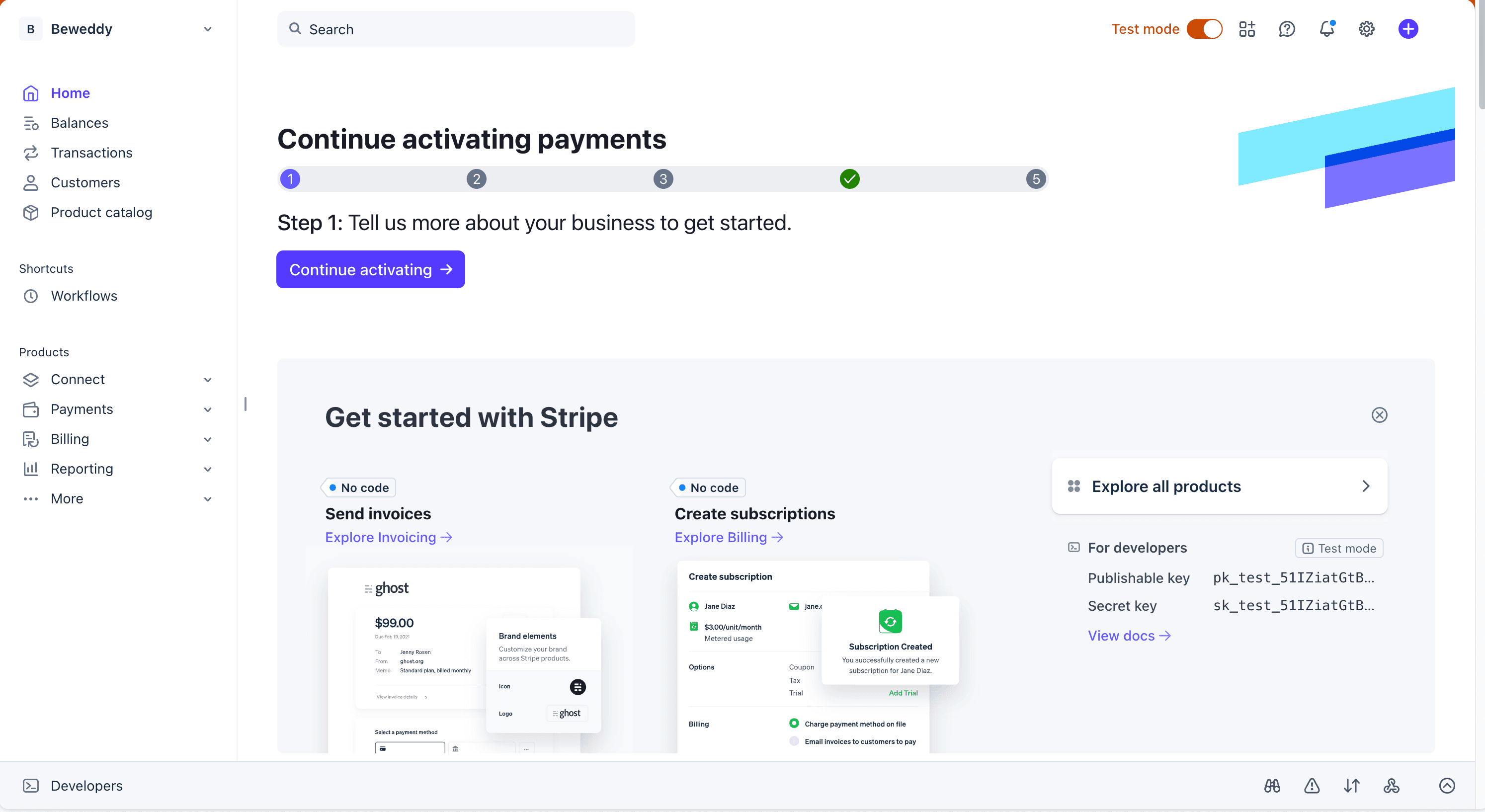
Step 1: Create Your Stripe Account
- Visit stripe.com
- Click "Start now"
- Complete account registration
- Verify your email
Step 2: Get Your API Keys
- Go to Developers > API keys
- Copy your test keys:
- Publishable key:
pk_test_xxxxx(frontend) - Secret key:
sk_test_xxxxx(backend)
- Publishable key:
Important: Start with test keys. Switch to live keys only for production.

Step 3: Generate Your Application
Describe your e-commerce needs to Cocoding AI:
Build an e-commerce store with Stripe payments:
- React frontend with product catalog
- NestJS backend with PostgreSQL
- Stripe integration for payments
- Shopping cart functionality
- Checkout with Stripe Elements
- Webhook handling for order status
- User authentication
- Order history and tracking
- Admin panel for product management
Step 4: Configure Environment
Add your Stripe credentials:
# backend/.env
STRIPE_SECRET_KEY=sk_test_xxxxxxxxxxxxxxxxxxxxx
STRIPE_WEBHOOK_SECRET=whsec_xxxxxxxxxxxxxxxxxxxxx
DATABASE_URL=postgresql://user:password@localhost:5432/store

# frontend/.env
VITE_STRIPE_PUBLISHABLE_KEY=pk_test_xxxxxxxxxxxxxxxxxxxxx

Step 5: Test Your Integration

Use Stripe's test card numbers:
| Scenario | Card Number | Result |
|---|---|---|
| Successful payment | 4242 4242 4242 4242 | Success |
| Card declined | 4000 0000 0000 0002 | Declined |
| Insufficient funds | 4000 0000 0000 9995 | Insufficient |
| 3D Secure required | 4000 0025 0000 3155 | Authentication |
Use any future expiry date and any 3-digit CVC.
Building the Checkout Experience
Product Catalog
┌──────────────────────────────────────────────────────┐
│              Our Products                            │
├──────────────────────────────────────────────────────┤
│                                                      │
│ ┌────────────┐ ┌────────────┐ ┌────────────┐        │
│ │   [IMG]    │ │   [IMG]    │ │   [IMG]    │        │
│ │            │ │            │ │            │        │
│ │ Product A  │ │ Product B  │ │ Product C  │        │
│ │ $29.99    │ │ $49.99    │ │ $19.99    │        │
│ │[Add Cart] │ │[Add Cart] │ │[Add Cart] │        │
│ └────────────┘ └────────────┘ └────────────┘        │
│                                                      │
└──────────────────────────────────────────────────────┘
Shopping Cart
┌──────────────────────────────────────────────────────┐
│              Shopping Cart (3 items)                 │
├──────────────────────────────────────────────────────┤
│                                                      │
│ Product A          [-] 2 [+]            $59.98      │
│ Product B          [-] 1 [+]            $49.99      │
│ Product C          [-] 1 [+]            $19.99      │
│                                                      │
│ ─────────────────────────────────────────────────── │
│ Subtotal                                $129.96     │
│ Shipping                                  $9.99     │
│ Tax                                      $11.70     │
│ ─────────────────────────────────────────────────── │
│ Total                                   $151.65     │
│                                                      │
│              [ Proceed to Checkout ]                 │
│                                                      │
└──────────────────────────────────────────────────────┘
Stripe Elements Checkout
┌──────────────────────────────────────────────────────┐
│              Secure Checkout                         │
├──────────────────────────────────────────────────────┤
│                                                      │
│ Shipping Address                                     │
│ ┌──────────────────────────────────────────────────┐ │
│ │ 123 Main Street, New York, NY 10001              │ │
│ └──────────────────────────────────────────────────┘ │
│                                                      │
│ Payment Details                    🔒 Secured by    │
│ ┌──────────────────────────────────────────────────┐ │
│ │ Card number                                      │ │
│ │ ┌────────────────────────────────────────────┐   │ │
│ │ │ 4242 4242 4242 4242                        │   │ │
│ │ └────────────────────────────────────────────┘   │ │
│ │                                                  │ │
│ │ Expiry          CVC                              │ │
│ │ ┌──────────┐   ┌──────────┐                     │ │
│ │ │ 12/26    │   │ 123      │                     │ │
│ │ └──────────┘   └──────────┘                     │ │
│ └──────────────────────────────────────────────────┘ │
│                                                      │
│              [ Pay $151.65 ]                         │
│                                                      │
│ 🔒 Your payment is secured by Stripe                │
│                                                      │
└──────────────────────────────────────────────────────┘
Webhook Integration
Why Webhooks Matter
Webhooks ensure your database stays synchronized with Stripe:
Payment Events:
├── payment_intent.succeeded → Create order, send confirmation
├── payment_intent.failed → Notify customer, log failure
├── charge.refunded → Update order status, notify customer
└── customer.subscription.* → Handle subscription changes
Setting Up Webhooks

For Local Development (Stripe CLI):
# Install Stripe CLI
brew install stripe/stripe-cli/stripe

# Login to your Stripe account
stripe login

# Forward webhooks to your local server
stripe listen --forward-to localhost:8001/api/webhooks/stripe
For Production:
- Go to Developers > Webhooks in Stripe Dashboard
- Add endpoint:
https://yourdomain.com/api/webhooks/stripe - Select events to listen for
- Copy the webhook signing secret
Webhook Handler
Your application verifies and processes webhooks:
Webhook Processing:
1. Receive POST request from Stripe
2. Verify signature (prevent tampering)
3. Parse event type
4. Process based on event:
   - payment_intent.succeeded → Fulfill order
   - payment_intent.failed → Alert customer
   - charge.refunded → Update records
5. Return 200 OK to acknowledge
Advanced Features
Multi-Currency Support
Accept payments in customer's local currency:
Supported Currencies:
├── USD, EUR, GBP, CAD, AUD
├── JPY, CNY, INR, BRL, MXN
├── CHF, SEK, NOK, DKK
└── 135+ total currencies
Subscription Payments
Add recurring billing:
Subscription Features:
├── Monthly/yearly plans
├── Free trials
├── Usage-based billing
├── Proration handling
└── Cancellation management
Saved Payment Methods
Let customers save cards:
Customer Convenience:
├── Save card for future purchases
├── One-click checkout
├── Multiple saved cards
└── Secure card management
Refund Handling
Process refunds easily:
Refund Options:
├── Full refund
├── Partial refund
├── Refund to original payment method
└── Automatic inventory adjustment
Security Best Practices
API Key Security
| Key Type | Usage | Exposure |
|---|---|---|
| Publishable (pk_) | Frontend | Safe to expose |
| Secret (sk_) | Backend only | NEVER expose |
| Webhook (whsec_) | Webhook verification | Backend only |
Fraud Prevention
Stripe Radar provides automatic protection:
- Machine learning fraud detection
- Customizable rules
- Block lists and allow lists
- 3D Secure authentication
- Address verification (AVS)
PCI Compliance
With Stripe Elements, you're automatically PCI DSS compliant:
- Card data never touches your servers
- Stripe handles all sensitive data
- No security questionnaires needed
- No expensive audits required
Production Checklist
Before going live:
Environment
- Switch to live API keys (
pk_live_,sk_live_) - Enable HTTPS on your domain
- Configure production webhook endpoint
- Set webhook signing secret
Stripe Account
- Complete business verification
- Add bank account for payouts
- Configure payout schedule
- Set up tax settings if needed
Testing
- Test successful payment flow
- Test declined card handling
- Test webhook processing
- Test refund flow
- Test error handling
Security
- Verify API keys are in environment variables
- Confirm no keys in source code
- Enable Stripe Radar rules
- Set up fraud alerts
Pricing Breakdown
Stripe Fees
| Region | Fee |
|---|---|
| US cards | 2.9% + $0.30 |
| International cards | 3.9% + $0.30 |
| Currency conversion | +1% |
No monthly fees - only pay when you process payments.
Example Calculations
| Sale Amount | Stripe Fee | You Receive |
|---|---|---|
| $10.00 | $0.59 | $9.41 |
| $50.00 | $1.75 | $48.25 |
| $100.00 | $3.20 | $96.80 |
| $500.00 | $14.80 | $485.20 |
Use Cases
Digital Products Store
Products: E-books, courses, software Features: Instant delivery, license keys, download links
Physical Goods E-Commerce
Products: Clothing, electronics, home goods Features: Shipping integration, inventory, tracking
Subscription Service
Products: SaaS, membership, box subscriptions Features: Recurring billing, plan management, trials
Marketplace Platform
Products: Multi-vendor marketplace Features: Split payments, vendor payouts, commission handling
Comparing Payment Solutions
| Feature | Stripe + Cocoding | Shopify | WooCommerce | Custom Dev |
|---|---|---|---|---|
| Setup time | Minutes | Hours | Days | Months |
| Transaction fees | 2.9% + $0.30 | 2.9% + $0.30 | Varies | 2.9% + $0.30 |
| Monthly fees | None | $29+ | Hosting | Hosting |
| Customization | Full | Limited | Moderate | Full |
| Code ownership | Yes | No | Yes | Yes |
| PCI compliance | Automatic | Automatic | Plugin | Complex |
Getting Started Today
Launch your e-commerce store:
- Sign up at cocoding.ai
- Create your Stripe account
- Describe your store requirements
- Generate your complete application
- Start selling immediately
Conclusion
Building a secure e-commerce payment system used to require specialized expertise and months of development. With Cocoding AI's Stripe integration, you can launch a complete online store with professional payment processing in minutes.
From product catalog to checkout to order management, everything is generated for you. Stripe handles the complex parts—PCI compliance, fraud protection, international payments—while you focus on growing your business.
Stop letting payment complexity hold back your e-commerce dreams. Build your store today.
Every great online business starts with accepting payments. Start accepting yours now.
Ready to launch your e-commerce store? Our team is here to help you build the perfect payment solution.