
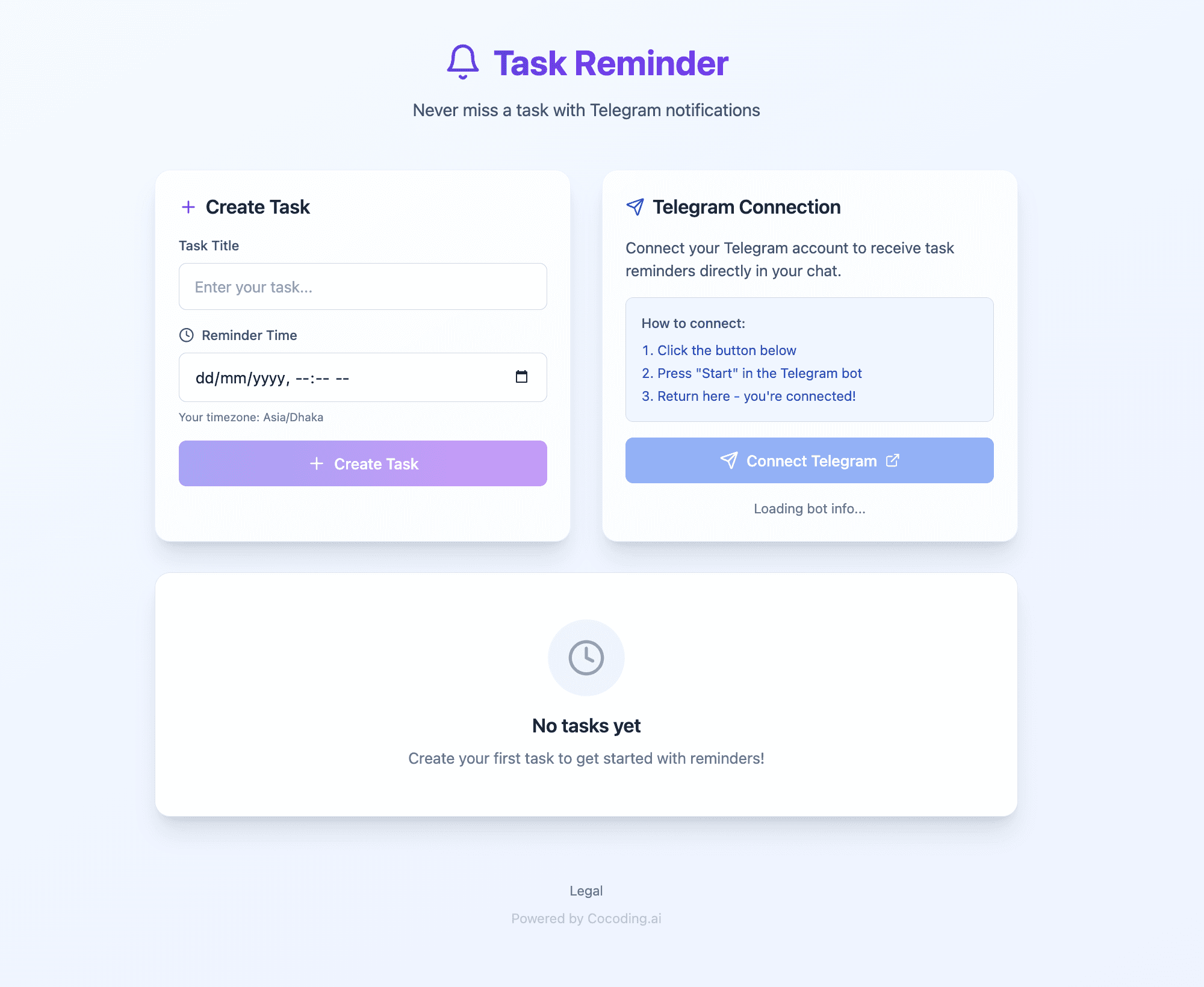
Telegram Integration: Build a Smart Task Reminder Bot That Never Lets You Forget
Telegram Integration: Build a Smart Task Reminder Bot That Never Lets You Forget

We all have great intentions to complete tasks, but life gets busy and things slip through the cracks. What if you had a personal assistant living in Telegram that reminded you of important tasks at exactly the right moment? With Cocoding AI, you can build a custom task reminder bot without writing a single line of code.
Why Telegram for Task Reminders?
Telegram isn't just a messaging app—it's a powerful platform for automation with over 800 million active users:
- Always with you - Notifications on every device
- Instant delivery - Messages arrive in real-time
- Rich bot ecosystem - Purpose-built for automation
- Free API - No per-message costs
- Cross-platform - Works on mobile, desktop, web
- No phone number sharing - Privacy-friendly usernames
For personal productivity and team task management, Telegram bots are incredibly effective.
The Productivity Problem
Studies show that the average professional:
- Forgets 40% of tasks within 24 hours without reminders
- Loses 2.1 hours daily to task switching and remembering what to do
- Misses deadlines 15% of the time due to poor tracking
- Feels overwhelmed by scattered task lists across apps
A dedicated reminder bot cuts through the noise and delivers timely nudges exactly when you need them.
What You Can Build
Complete Task Reminder System
Cocoding AI generates a full-featured application:
Application Features:
├── Task Management
│   ├── Create tasks with titles
│   ├── Set date and time
│   ├── Categorize tasks
│   └── Mark as complete
├── Telegram Bot
│   ├── Connect user accounts
│   ├── Scheduled reminders
│   ├── Interactive commands
│   └── Reply-based completion
├── Web Dashboard
│   ├── Task overview
│   ├── Calendar view
│   └── History tracking
└── Scheduling Engine
    ├── Timezone support
    ├── Recurring tasks
    └── Smart reminders
Technical Architecture
Tech Stack:
├── Frontend (React)
│   ├── Task creation form
│   ├── Dashboard view
│   └── Calendar interface
├── Backend (NestJS)
│   ├── Telegram Bot API
│   ├── Task scheduling
│   └── PostgreSQL + TypeORM
└── Services
    ├── Bot message handling
    ├── Reminder scheduler
    └── User management
Step-by-Step Setup Guide
Step 1: Create Your Telegram Bot
- Open Telegram and search for @BotFather
- Start a chat and send
/newbot - Choose a name for your bot (e.g., "My Task Reminder")
- Choose a username (must end in
bot, e.g.,mytask_reminder_bot) - Copy the API token BotFather provides
Your bot token:
123456789:ABCdefGHIjklMNOpqrsTUVwxyz
Important: Keep this token secret!

Step 2: Generate Your Application
Describe your needs to Cocoding AI:
Build a task reminder application with Telegram bot:
- React frontend with task management UI
- NestJS backend with PostgreSQL
- Telegram bot integration for sending reminders
- Task creation with title, date, and time
- Scheduled reminders delivered via Telegram
- User account connection to Telegram
- Dashboard showing all tasks and their status
- Support for my timezone (EST/GMT-5)

Step 3: Configure Environment
Add your bot token:
# backend/.env
TELEGRAM_BOT_TOKEN=123456789:ABCdefGHIjklMNOpqrsTUVwxyz
DATABASE_URL=postgresql://user:password@localhost:5432/tasks
APP_TIMEZONE=America/New_York

Step 4: Connect Your Telegram Account
- Open your application
- Click "Connect Telegram"
- Click the link to open your bot in Telegram
- Send
/startto the bot - Your account is now connected
Step 5: Test Your First Reminder
- Create a task: "Test reminder"
- Set time: 2 minutes from now
- Wait for Telegram notification
- Verify message received
Building the User Experience
Task Creation Interface
┌──────────────────────────────────────────────────────┐
│              Create New Task                         │
├──────────────────────────────────────────────────────┤
│                                                      │
│ Task Title:                                          │
│ ┌──────────────────────────────────────────────────┐ │
│ │ Submit quarterly report                          │ │
│ └──────────────────────────────────────────────────┘ │
│                                                      │
│ Category:                                            │
│ ┌──────────────────────────────────────────────────┐ │
│ │ Work                                         ▼   │ │
│ └──────────────────────────────────────────────────┘ │
│                                                      │
│ Remind me on:                                        │
│ ┌─────────────────┐  ┌─────────────────┐            │
│ │ June 20, 2025   │  │ 9:00 AM         │            │
│ └─────────────────┘  └─────────────────┘            │
│                                                      │
│ Priority:                                            │
│ ○ Low   ● Medium   ○ High                           │
│                                                      │
│ Notes (optional):                                    │
│ ┌──────────────────────────────────────────────────┐ │
│ │ Include sales figures and projections            │ │
│ └──────────────────────────────────────────────────┘ │
│                                                      │
│              [ Create Task ]                         │
│                                                      │
└──────────────────────────────────────────────────────┘
Telegram Reminder Message
Your bot sends clear, actionable reminders:
🔔 Task Reminder

📋 Submit quarterly report

📅 Due: June 20, 2025 at 9:00 AM
📁 Category: Work
⚡ Priority: Medium

📝 Notes: Include sales figures and projections

Reply:
✅ /done - Mark as complete
⏰ /snooze - Remind me in 1 hour
📅 /postpone - Reschedule for tomorrow
Dashboard View
┌──────────────────────────────────────────────────────┐
│              Task Dashboard                          │
├──────────────────────────────────────────────────────┤
│                                                      │
│   📋 Total        ✅ Completed    ⏳ Pending         │
│      24              18              6               │
│                                                      │
│   🔔 Due Today    📅 This Week    ⚠️ Overdue        │
│      3               8               1               │
│                                                      │
├──────────────────────────────────────────────────────┤
│ Today's Tasks:                                       │
├──────────────────────────────────────────────────────┤
│ ⬜ 9:00 AM  │ Submit quarterly report   │ Work      │
│ ⬜ 11:00 AM │ Team standup meeting      │ Work      │
│ ✅ 2:00 PM  │ Call dentist              │ Personal  │
└──────────────────────────────────────────────────────┘
Bot Commands
User Commands
| Command | Description |
|---|---|
/start | Connect your account |
/tasks | List all pending tasks |
/today | Show today's tasks |
/done [id] | Mark task as complete |
/snooze [id] | Snooze for 1 hour |
/postpone [id] | Move to tomorrow |
/help | Show available commands |
Interactive Replies
When users reply to reminders:
User: ✅ (or "done")
Bot: Great! Task "Submit quarterly report" marked as complete. 🎉

User: ⏰ (or "snooze")
Bot: Got it! I'll remind you again in 1 hour.

User: 📅 (or "tomorrow")
Bot: Rescheduled! I'll remind you tomorrow at 9:00 AM.
Advanced Features
Recurring Tasks
Support repeating reminders:
Recurring Options:
├── Daily at specific time
├── Weekly on selected days
├── Monthly on specific date
├── Custom intervals
└── End date or number of occurrences
Smart Scheduling
Intelligent reminder timing:
Smart Features:
├── Morning digest (all day's tasks at 8 AM)
├── Pre-deadline warnings (1 day, 1 hour before)
├── Quiet hours (no notifications 10 PM - 7 AM)
└── Weekend handling (defer or include)
Task Categories
Organize tasks by type:
Default Categories:
├── 💼 Work
├── 🏠 Personal
├── 🛒 Shopping
├── 💪 Health
├── 📚 Learning
└── Custom categories
Priority Levels
Visual priority indicators:
🔴 High - Critical tasks, multiple reminders
🟡 Medium - Important tasks, standard reminders
🟢 Low - Optional tasks, single reminder
Security Best Practices
Token Protection
Your bot token is powerful. Protect it:
- Never commit to Git - Add to
.gitignore - Use environment variables - Never hardcode
- Rotate if compromised -
/revokewith BotFather - Monitor usage - Check for unauthorized access
User Data Protection
- Encrypt sensitive data at rest
- Secure database connections with SSL
- Implement rate limiting to prevent abuse
- Allow data deletion on user request
Bot Security
Security Measures:
├── Verify webhook requests
├── Validate user input
├── Sanitize message content
├── Log suspicious activity
└── Implement user blocking
Production Considerations
Rate Limits
Telegram API limits:
| Action | Limit |
|---|---|
| Messages per second | 30 |
| Messages to same user | 1/second |
| Bulk notifications | 30 messages/second |
| Group messages | 20 messages/minute |
Scalability
For high-volume usage:
- Use message queues for scheduling
- Implement webhook instead of polling
- Cache user data
- Monitor bot health
Verification
For bots with many users:
- Contact Telegram support
- Provide bot description
- Get verification badge
- Higher rate limits
Use Cases
Personal Productivity
Challenge: Forgetting personal tasks and appointments
Solution:
- Quick task creation via web or bot
- Morning task digest
- Location-based reminders
- Habit tracking
Result: Never miss important personal tasks
Team Task Management
Challenge: Coordinating tasks across team members
Solution:
- Shared task lists
- Assignment notifications
- Progress tracking
- Deadline reminders for all
Result: Improved team coordination
Student Study Planner
Challenge: Managing assignments and exam prep
Solution:
- Assignment due date tracking
- Study session reminders
- Exam countdown notifications
- Progress motivation
Result: Better academic performance
Freelancer Project Tracker
Challenge: Juggling multiple client projects
Solution:
- Project-based task organization
- Client deadline tracking
- Invoice reminders
- Time tracking notifications
Result: No missed deadlines, happier clients
Customization Options
Ask Cocoding AI to add features:
Daily Summary
Send me a daily summary at 8 AM with all tasks
for the day, organized by priority.
Natural Language Input
Allow users to create tasks by typing naturally,
like "remind me to call mom tomorrow at 3pm"
Integration with Calendar
Sync tasks with Google Calendar so reminders
appear on my calendar too.
Voice Notes
Allow users to send voice messages that get
transcribed into task descriptions.
Progress Analytics
Add a weekly report showing tasks completed,
completion rate, and productivity trends.
Comparing Reminder Solutions
| Feature | Cocoding + Telegram | Todoist | Apple Reminders | Google Tasks |
|---|---|---|---|---|
| Instant notifications | Yes | Yes | Yes | Yes |
| Custom bot | Yes | No | No | No |
| API cost | Free | Paid tier | Free | Free |
| Cross-platform | Yes | Yes | Apple only | Yes |
| Bot commands | Yes | No | No | No |
| Full customization | Yes | Limited | Limited | Limited |
| Own your data | Yes | No | No | No |
Getting Started Today
Build your personal productivity bot:
- Sign up at cocoding.ai
- Create your Telegram bot via @BotFather
- Describe your ideal reminder system
- Generate your application
- Never forget a task again
Conclusion
In a world full of distractions, having a dedicated assistant that sends you the right reminder at the right time is invaluable. With Cocoding AI's Telegram integration, you can build a personalized task reminder bot that fits exactly how you work.
Unlike generic productivity apps, your custom bot can include exactly the features you need—and nothing you don't. Whether you're managing personal tasks, coordinating a team, or juggling client projects, a Telegram bot keeps everything on track.
Stop relying on memory. Stop missing deadlines. Build your reminder bot today.
The best reminder is the one you actually see. Make sure you never miss another.
Ready to build your productivity bot? Our team is here to help you create the perfect task reminder system.