
WhatsApp Integration: Build Automated Appointment Reminders That Reduce No-Shows by 80%
WhatsApp Integration: Build Automated Appointment Reminders That Reduce No-Shows by 80%

No-shows cost businesses an estimated $150 billion annually in the US alone. Healthcare practices, salons, consultants, and service providers all struggle with missed appointments. What if you could send automated WhatsApp reminders that clients actually see and respond to? With Cocoding AI, you can build this system in minutes.
Why WhatsApp for Business Communication?
WhatsApp isn't just a messaging app—it's the world's most popular communication platform with over 2 billion active users:
- 98% open rate - Far higher than email (20%) or SMS (90%)
- 45% response rate - Clients engage with WhatsApp messages
- Global reach - Available in 180+ countries
- Trust factor - Clients prefer WhatsApp over unknown numbers
- Rich media - Send images, documents, location pins
For appointment reminders, WhatsApp dramatically outperforms traditional methods.
The Cost of No-Shows
| Industry | Average No-Show Rate | Annual Cost per Provider |
|---|---|---|
| Healthcare | 23% | $150,000+ |
| Salons/Spas | 30% | $30,000+ |
| Consulting | 15% | $25,000+ |
| Fitness | 20% | $15,000+ |
| Restaurants | 10% | $10,000+ |
Automated reminders can reduce no-shows by up to 80%, directly impacting your bottom line.
What You Can Build
Complete Appointment System
Cocoding AI generates a full-featured application:
Application Features:
├── Appointment Management
│   ├── Create appointments with client details
│   ├── View upcoming schedule
│   ├── Edit appointment times
│   └── Cancel/reschedule functionality
├── WhatsApp Reminders
│   ├── Automated scheduling
│   ├── Custom message templates
│   ├── Timezone support
│   └── Delivery confirmation
├── Client Database
│   ├── Contact information
│   ├── Appointment history
│   └── Communication logs
└── Dashboard
    ├── Today's appointments
    ├── Reminder status
    └── No-show statistics
Technical Stack
Tech Stack:
├── Frontend (React)
│   ├── Appointment calendar
│   ├── Client management
│   └── Dashboard analytics
├── Backend (NestJS)
│   ├── Twilio WhatsApp API
│   ├── Scheduled jobs
│   └── PostgreSQL database
└── Services
    ├── Appointment scheduling
    ├── Reminder automation
    └── Delivery tracking
Step-by-Step Setup Guide
Step 1: Create Your Twilio Account
- Visit twilio.com
- Click "Sign up"
- Verify your email and phone number
- Complete account setup
Free trial includes: $15.50 credit for testing
Step 2: Enable WhatsApp Sandbox
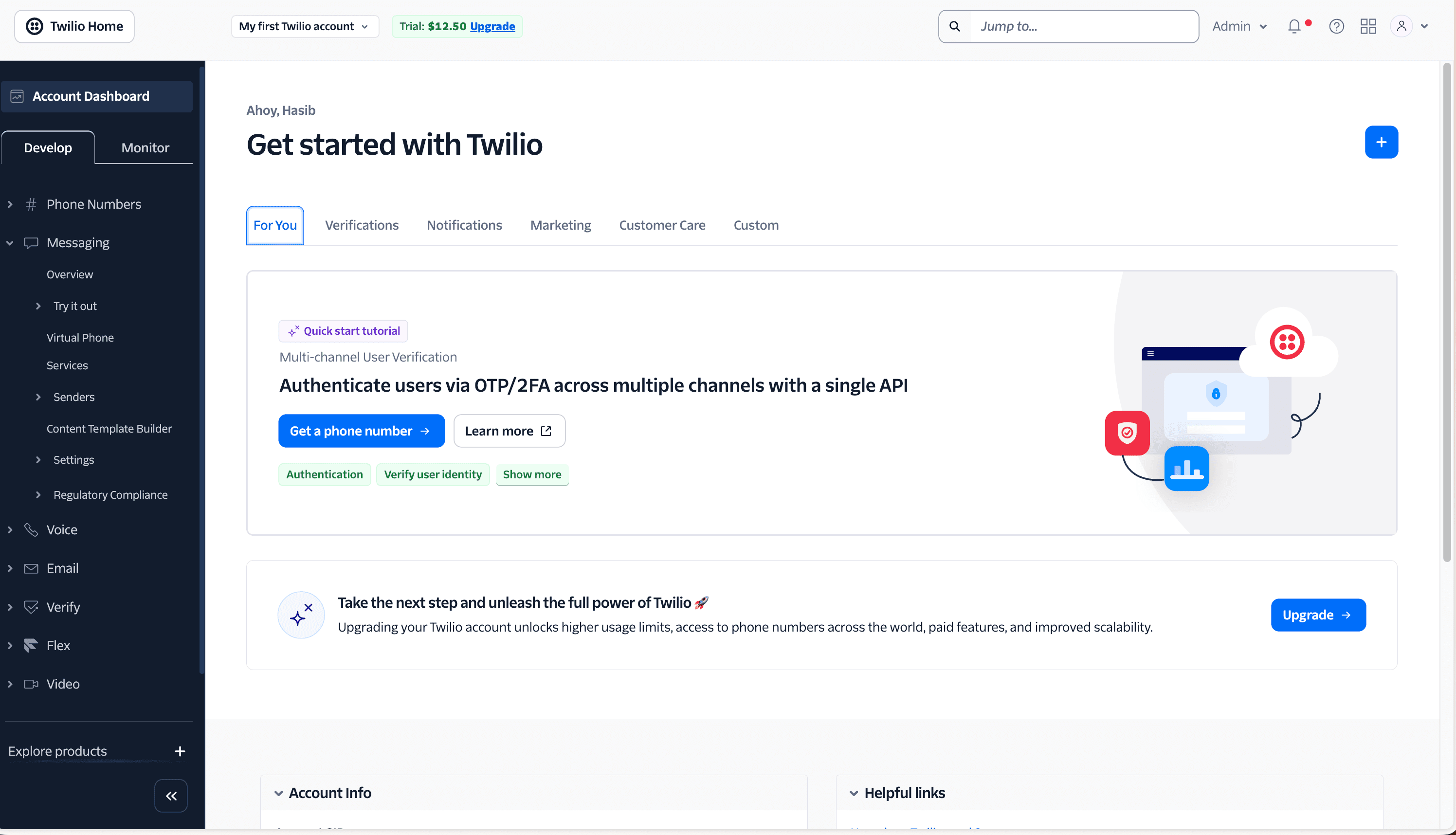
- Go to Messaging > Try it out > Send a WhatsApp message
- Follow instructions to join the sandbox
- Send the join code from your phone
- Note your sandbox number
Step 3: Get Your Credentials
From the Twilio Console dashboard, copy:
- Account SID:
ACxxxxxxxxxxxxxxxxxxxxxxxxxxxxxxxxx - Auth Token:
xxxxxxxxxxxxxxxxxxxxxxxxxxxxxxxx - WhatsApp Number:
whatsapp:+14155238886(sandbox)
Step 4: Generate Your Application
Describe your needs to Cocoding AI:
Build an appointment reminder system with WhatsApp:
- React frontend with appointment calendar
- NestJS backend with PostgreSQL
- Twilio WhatsApp integration for sending messages
- Automated reminders 24 hours before appointments
- Client management with contact details
- Timezone support (my timezone is GMT-5)
- Dashboard showing today's appointments and reminder status
Step 5: Configure Environment
Add your Twilio credentials:
# backend/.env
TWILIO_ACCOUNT_SID=ACxxxxxxxxxxxxxxxxxxxxxxxxxxxxxxxxx
TWILIO_AUTH_TOKEN=xxxxxxxxxxxxxxxxxxxxxxxxxxxxxxxx
TWILIO_WHATSAPP_FROM=whatsapp:+14155238886

DATABASE_URL=postgresql://user:password@localhost:5432/appointments
TIMEZONE=America/New_York

Step 6: Test Your System
- Create a test appointment for tomorrow
- Set reminder time to 1 minute from now (for testing)
- Verify WhatsApp message arrives
- Check delivery status in dashboard
Building the Reminder System
Appointment Creation Form
┌──────────────────────────────────────────────────────┐
│           New Appointment                            │
├──────────────────────────────────────────────────────┤
│                                                      │
│ Client Name:                                         │
│ ┌──────────────────────────────────────────────────┐ │
│ │ John Smith                                       │ │
│ └──────────────────────────────────────────────────┘ │
│                                                      │
│ Phone Number (with country code):                    │
│ ┌──────────────────────────────────────────────────┐ │
│ │ +1 555 123 4567                                  │ │
│ └──────────────────────────────────────────────────┘ │
│                                                      │
│ Service:                                             │
│ ┌──────────────────────────────────────────────────┐ │
│ │ Consultation (60 min)                        ▼   │ │
│ └──────────────────────────────────────────────────┘ │
│                                                      │
│ Date & Time:                                         │
│ ┌─────────────────┐  ┌─────────────────┐            │
│ │ June 15, 2025   │  │ 2:00 PM         │            │
│ └─────────────────┘  └─────────────────┘            │
│                                                      │
│ Notes:                                               │
│ ┌──────────────────────────────────────────────────┐ │
│ │ First-time client, referred by Mary              │ │
│ └──────────────────────────────────────────────────┘ │
│                                                      │
│            [ Schedule Appointment ]                  │
│                                                      │
└──────────────────────────────────────────────────────┘
WhatsApp Message Format
Your automated reminders look professional:
📅 Appointment Reminder

Hi John! This is a friendly reminder about your upcoming appointment:

📍 Service: Consultation
📆 Date: June 15, 2025
⏰ Time: 2:00 PM
📍 Location: 123 Main Street

Please reply:
✅ CONFIRM to confirm your appointment
❌ CANCEL if you need to reschedule

We look forward to seeing you!
- Your Business Name
Dashboard Overview
┌──────────────────────────────────────────────────────┐
│              Today's Dashboard                       │
├──────────────────────────────────────────────────────┤
│                                                      │
│   📅 Today          ✅ Confirmed    ⏳ Pending       │
│      12                 8              4             │
│                                                      │
│   📱 Sent Today     📬 Delivered    ❌ Failed        │
│      15                14              1             │
│                                                      │
├──────────────────────────────────────────────────────┤
│ Upcoming Appointments:                               │
├──────────────────────────────────────────────────────┤
│ 9:00 AM  │ Sarah Johnson │ Haircut    │ ✅ Confirmed│
│ 10:30 AM │ Mike Chen     │ Coloring   │ ⏳ Pending  │
│ 12:00 PM │ Emma Wilson   │ Treatment  │ ✅ Confirmed│
│ 2:00 PM  │ John Smith    │ Consult    │ ⏳ Pending  │
│ 3:30 PM  │ Lisa Brown    │ Styling    │ ✅ Confirmed│
└──────────────────────────────────────────────────────┘
Phone Number Formatting
Critical Requirement
WhatsApp requires international format with country codes:
| Format | Example | Valid? |
|---|---|---|
| With + and country code | +1 555 123 4567 | Yes |
| With country code only | 1 555 123 4567 | Yes |
| Local format | 555 123 4567 | No |
| With dashes | 555-123-4567 | No |
Auto-Formatting
Your application can auto-format numbers:
const formatPhoneNumber = (phone, countryCode = '+1') => {
  // Remove all non-numeric characters
  const cleaned = phone.replace(/\D/g, '');

  // Add country code if missing
  if (!cleaned.startsWith('1') && countryCode === '+1') {
    return `+1${cleaned}`;
  }

  return `+${cleaned}`;
};
Advanced Features
Multiple Reminder Times
Configure when reminders are sent:
Reminder Schedule:
├── 24 hours before (default)
├── 2 hours before (optional)
└── 30 minutes before (optional)
Reply Handling
Process client responses:
Client replies "CONFIRM"
→ Update appointment status to "Confirmed"
→ Send confirmation message
→ Log interaction

Client replies "CANCEL"
→ Update appointment status to "Cancelled"
→ Send cancellation confirmation
→ Alert staff for rescheduling
Recurring Appointments
Support regular clients:
Create recurring appointment:
- Every Monday at 10:00 AM
- Every 2 weeks on Friday
- Monthly on the 15th
Staff Notifications
Alert your team:
New appointment booked:
- Send email to assigned staff
- Update team calendar
- Slack notification to channel
Production Deployment
Moving Beyond Sandbox
The WhatsApp sandbox has limitations. For production:
-
Request a Twilio WhatsApp Number
- Go to Phone Numbers in Twilio Console
- Request a WhatsApp-enabled number
-
Complete Facebook Verification
- Register with Facebook Business Manager
- Complete business verification (1-2 weeks)
- Get WhatsApp Business API approval
-
Message Template Approval
- Create message templates
- Submit for WhatsApp approval
- Templates required for outbound messages
Pricing Considerations
| Component | Cost |
|---|---|
| Twilio WhatsApp number | $1/month |
| Outbound messages | ~$0.005/message |
| Inbound messages | ~$0.005/message |
| Template messages | Varies by country |
Example: 1,000 reminders/month = ~$5/month
Use Cases
Medical Practice
Challenge: 23% no-show rate costing $150k/year
Solution:
- Automated 24-hour and 2-hour reminders
- Confirmation tracking
- Cancellation management
- Waitlist notifications
Result: No-show rate dropped to 5%
Hair Salon
Challenge: Last-minute cancellations leaving gaps
Solution:
- Reminder with confirmation request
- Quick reschedule option
- Automatic waitlist notification
- Prepayment option for high-risk slots
Result: 80% reduction in no-shows
Consulting Business
Challenge: Clients forgetting video call links
Solution:
- Reminder with meeting link
- Calendar attachment
- Time zone conversion
- 15-minute heads-up message
Result: Nearly zero missed meetings
Fitness Studio
Challenge: Class no-shows affecting capacity planning
Solution:
- Class reminder 3 hours before
- Easy cancellation for waitlist
- Spot availability notifications
- Streak tracking for motivation
Result: Better capacity utilization
Best Practices
Message Content
Do:
- Keep messages concise
- Include essential details only
- Provide clear call-to-action
- Use professional tone
Don't:
- Send marketing in reminders
- Use excessive emojis
- Include long paragraphs
- Send multiple reminders too close together
Timing
Optimal reminder times:
- 24 hours before: Primary reminder
- 2-3 hours before: Final reminder
- Avoid: Late night or early morning
Compliance
- Opt-in required: Get consent before messaging
- Opt-out option: Always include unsubscribe method
- Data protection: Secure phone numbers
- WhatsApp policies: Follow messaging guidelines
Comparing Reminder Solutions
| Feature | Cocoding + WhatsApp | SMS | Phone Calls | |
|---|---|---|---|---|
| Open rate | 98% | 90% | 20% | N/A |
| Response rate | 45% | 30% | 5% | 60% |
| Cost per message | $0.005 | $0.01-0.05 | Free | $0.50+ |
| Rich media | Yes | Limited | Yes | No |
| Two-way chat | Yes | Yes | Limited | Yes |
| Automation | Full | Full | Full | Limited |
Getting Started Today
Reduce your no-shows starting now:
- Sign up at cocoding.ai
- Create your Twilio account
- Describe your reminder system
- Generate your application
- Start reducing no-shows
Conclusion
No-shows don't have to be an accepted cost of doing business. With WhatsApp's unmatched engagement rates and Cocoding AI's rapid development capabilities, you can build an automated appointment reminder system that dramatically reduces missed appointments.
The math is simple: if you're losing $30,000+ annually to no-shows, a system that costs pennies per message and reduces no-shows by 80% pays for itself immediately.
Stop losing revenue to forgotten appointments. Build your WhatsApp reminder system today.
Every reminded client is a kept appointment. Every kept appointment is revenue earned.
Ready to eliminate no-shows? Our team can help you build the perfect reminder system for your business.